I’ve been a storyboard artist for the past 25 years mostly in animation series work and have been using
Toon Boom Storyboard Pro for the last two years. I am very satisfied with results.
I have no financial interest in Toon Boom, but I feel every board artist should at least try SBPro. I’ve worked in Flash, Sketch, Photoshop and Painter and feel the data management tools in this program make it far and away the strongest tool to board with. The program has lots of features but I’ve tried to highlight just the features I really like or dislike. (A Cintiq is necessary to take full advantage of the program.)
Pros
Drawing:
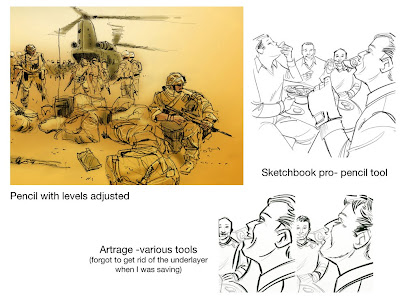
Brushes: There are textured and non-textured brushes. The textured give a look more like pencil but add considerably to the file’s size. The non-textured is more like drawing with a Pentel but if the client is agreeable, provides nice clean output to various media.
Painting Behind: There is a great function that allows painting behind line already put down. It’s great for adding tone to line-work.
Layers: You can draw the BG on a layer and easily garbage matte the characters over to facilitate reuse of both BG and characters.
Slide layers: You can copy layers from scene to another by simply sliding the layer along the timeline. Or if you are reusing it later in the board, select it and copy and paste it in the later scene. There is the option of adding it to the library, but I found this too cumbersome and confusing for SBPro in transfer between platforms.
Data management:
Script Import: You can import the entire script into the program and just copy and paste into the panel description, action, notes, and etc. flds. There are hooks to get info directly from Final Draft but I’ve yet to use them. I get scripts as PDF, export to text, import into SBPro, and copy and paste from there. This makes it easy to shift text during any revision.
Image Import: You can import image files into SBPro. If you bring in all your drawings, it increases the file size incrementally. I use it to import character and BG designs after I use Photoshop to crunch their size down. I’ve also have a series of perspective grids I use to help layout scenes.
Renumber scenes: This is particularly good for animated series work. Add or drop scenes throughout the process esp. in revision. At the end, go to the first scene and hit renumber entire board. Remember the time spent adding Pg 1a, 1B, 1bzz… The program does it in a snap.
Export: This is the real time saver for production (i.e. our clients.) SBPro will export to PDF, individual images (psd, tga, jpg), an entire QT of the board –you can time the board in the program including ramped camera moves, or an EDL with individual QT files for each scene. This makes the workflow into editing programs really fast.
Cross Platform: I work on a Macbook Pro. I FTP or hand transfer files to different clients on PCs. So far there’s been no issues that way. Back to the Mac from PC has given me problems in the past.
Cons
Expensive: SBPro doesn’t have an installed base like Flash, but the larger studios sometimes provide a cut while you’re on their job. However, this means you can’t read your files once your return the license dongle.
No Save As function: This means you can’t easily save versions of your boards.
Back and Forth Cross platform: As said before, I’ve had issues with transfers back to Mac from PC, so I stay away .
Large files: SBPro files can become huge –I’ve seen some come in at over 20 Gigs- This is usually a function of importing images into the program rather than drawing them in.
For advertising or presentation artists, the ability of SBPro to import, make pans, and moves on their art allows them to create animatics easily.
Hope this intrigues you enough to try it out.

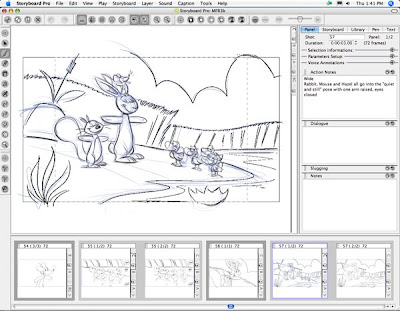
This shows the Drawing view of SBPro. The timeline refers to the frame highlighted and shows where layers can be slid along to copy. The side bar shows the layers (BG, A, B, C The rough level is turned on.) that can be turned on an off to display. The timing of the panels is 3 sec. The action notes are copied directly from the script. Drawn with non-textured brushes.
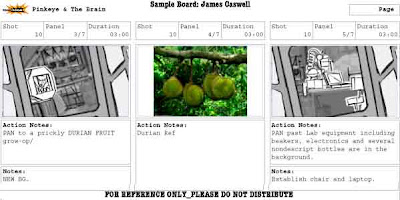
This PDF is a little blurry but this demonstrates how much information is pulled from the board to be displayed and how art (in this case production BG and internet reference for the designers) can be imported into the board.